# Lipsync Jaw twisted
**URL:** https://forum.convai.com/t/lipsync-jaw-twisted/3484
**Category:** Unity SDK
**Tags:** question, unity
**Created:** [April 3, 2025, 6:14am UTC](https://forum.convai.com/t/lipsync-jaw-twisted/3484 "2025-04-03T06:14:15Z")
**Posts on this page:** 5
**Page:** 1
### Author:  [@sh.min](https://forum.convai.com/u/sh.min)
#### Post date: [April 3, 2025, 6:14am UTC](https://forum.convai.com/t/lipsync-jaw-twisted/3484/1 "2025-04-03T06:14:15Z")

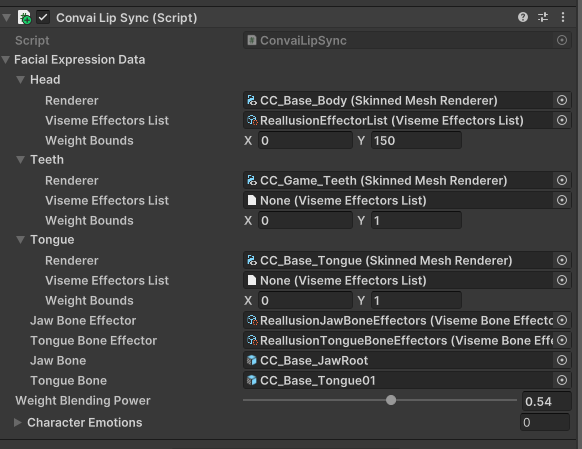
Theres no blendshape animation in idle,
and i set the avatar\>jaw none.
still the jaw twisted

the jaw of another character that i forgot to put viseme works good
whats the problem
---
### Author:  [@K3](https://forum.convai.com/u/K3)
#### Post date: [April 3, 2025, 12:11pm UTC](https://forum.convai.com/t/lipsync-jaw-twisted/3484/2 "2025-04-03T12:11:05Z")
Hello @sh.min,
**Welcome to the Convai Developer Forum!**
Sorry to hear you’re running into this issue.
Could you please start the scene and share a screenshot of the blendshape values under `CC_Base_Body` while the scene is running?
---
### Author:  [@sh.min](https://forum.convai.com/u/sh.min)
#### Post date: [April 4, 2025, 12:18am UTC](https://forum.convai.com/t/lipsync-jaw-twisted/3484/3 "2025-04-04T00:18:16Z")

Seems blendshapes working good, theres something wrong on jawbone setting

i ve never modified the Jaw bone in CC4 but the rotation of z value was -180.
Any descriptions to fix this?
---
### Author:  [@K3](https://forum.convai.com/u/K3)
#### Post date: [April 4, 2025, 7:20am UTC](https://forum.convai.com/t/lipsync-jaw-twisted/3484/4 "2025-04-04T07:20:51Z")
Thanks for sharing the details.
I’d recommend trying to reimport the character or testing with a different one to see if the issue persists. Also, you might want to check the Reallusion Forums for any known issues with jawbone rotation from CC4 exports.
---
### Author:  [@system](https://forum.convai.com/u/system)
#### Post date: [May 4, 2025, 7:21am UTC](https://forum.convai.com/t/lipsync-jaw-twisted/3484/5 "2025-05-04T07:21:42Z")
This topic was automatically closed 30 days after the last reply. New replies are no longer allowed.