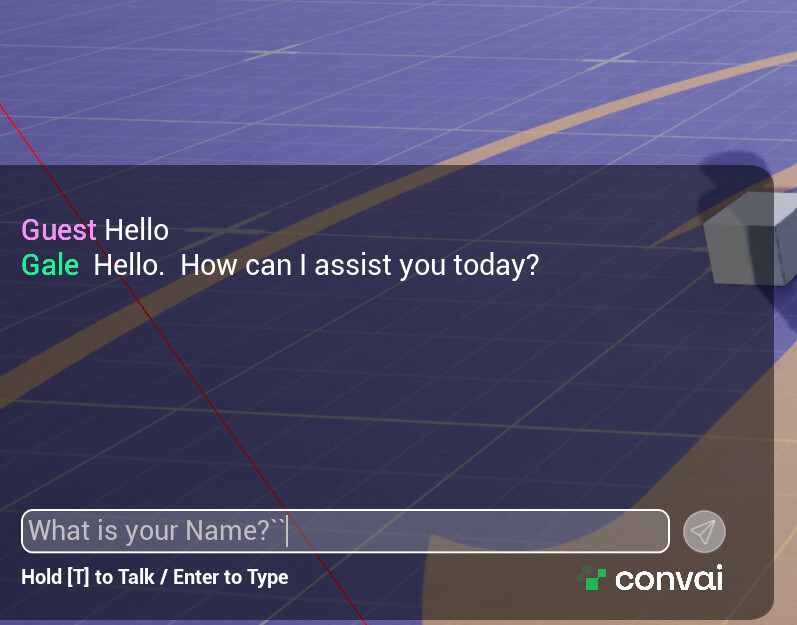
I‘m having an issue getting a response from the Convai character. I’m using UE5.6. I have a Metahuman character. The character responds to text input but not voice conversation. Voice chat is not showing in the text box. I have troubleshooted the microphone, and everything is working. I tested on Convai Playground, and voice input works there. I receive a string output when I push down the T key on the screen, and the output log. Not sure how to fix the issue. Can you help with this matter? Thaks!
Output log:
ConvaiSubsystemLog: Start Run
ConvaiSubsystemLog: UConvaiSubsystem Started
LogChaosDD: Creating Chaos Debug Draw Scene for world DefaultLevel
LogPlayLevel: PIE: World Init took: (0.002628s)
LogAudio: Display: Creating Audio Device: Id: 14, Scope: Unique, Realtime: True
LogAudioMixer: Display: Audio Mixer Platform Settings:
LogAudioMixer: Display: Sample Rate: 48000
LogAudioMixer: Display: Callback Buffer Frame Size Requested: 1024
LogAudioMixer: Display: Callback Buffer Frame Size To Use: 1024
LogAudioMixer: Display: Number of buffers to queue: 1
LogAudioMixer: Display: Max Channels (voices): 32
LogAudioMixer: Display: Number of Async Source Workers: 4
LogAudio: Display: AudioDevice MaxSources: 32
LogAudio: Display: Audio Spatialization Plugin: None (built-in).
LogAudio: Display: Audio Reverb Plugin: None (built-in).
LogAudio: Display: Audio Occlusion Plugin: None (built-in).
LogAudioMixer: Display: Initializing audio mixer using platform API: ‘XAudio2’
LogAudioMixer: Display: Using Audio Hardware Device Headset Earphone (Plantronics Blackwire 5220 Series)
LogAudioMixer: Display: Initializing Sound Submixes…
LogAudioMixer: Display: Creating Master Submix ‘MasterSubmixDefault’
LogAudioMixer: Display: Creating Master Submix ‘MasterReverbSubmixDefault’
LogAudioMixer: FMixerPlatformXAudio2::StartAudioStream() called. InstanceID=14
LogAudioMixer: Display: Output buffers initialized: Frames=1024, Channels=2, Samples=2048, InstanceID=14
LogAudioMixer: Display: Starting AudioMixerPlatformInterface::RunInternal(), InstanceID=14
LogAudioMixer: Display: FMixerPlatformXAudio2::SubmitBuffer() called for the first time. InstanceID=14
LogInit: FAudioDevice initialized with ID 14.
LogAudio: Display: Audio Device (ID: 14) registered with world ‘DefaultLevel’.
LogAudioMixer: Initializing Audio Bus Subsystem for audio device with ID 14
LogLoad: Game class is ‘GM_Sandbox_C’
LogWorld: Bringing World /Game/Levels/UEDPIE_0_DefaultLevel.DefaultLevel up for play (max tick rate 60) at 2025.10.29-21.46.25
LogWorld: Bringing up level for play took: 0.050225
LogOnline: OSS: Created online subsystem instance for: :Context_27
LogVoiceEncode: Display: EncoderVersion: libopus unknown
LogOnlineVoice: OSS: StopLocalVoiceProcessing(0) returned 0xFFFFFFFF
LogOnlineVoice: OSS: Stopping networked voice for user: 0
ConvaiPlayerLog: UConvaiPlayerComponent: Found submix “AudioInput”
LogSkeletalMesh: USkeletalMeshComponent: Recreating Clothing Actors for ‘TwinBlast’ with ‘KOM2_UECC4’
Cmd: voice.MicNoiseGateThreshold 0.01
voice.MicNoiseGateThreshold = “0.01”
Cmd: voice.SilenceDetectionThreshold 0.001
voice.SilenceDetectionThreshold = “0.001”
PIE: Server logged in
PIE: Play in editor total start time 0.312 seconds.
LogBlueprintUserMessages: [MicSettings_WB_C_0] Device Set Succesfully
LogBlueprintUserMessages: [CBP_SandboxCharacter_KOM2CC4_C_0] Hello
LogBlueprintUserMessages: [CBP_SandboxCharacter_KOM2CC4_C_0] Hello
LogBlueprintUserMessages: [CBP_SandboxCharacter_KOM2CC4_C_0] Hello
LogBlueprintUserMessages: [CBP_SandboxCharacter_KOM2CC4_C_0] Hello
LogSlate: Updating window title bar state: overlay mode, drag disabled, window buttons hidden, title bar hidden
LogWorld: BeginTearingDown for /Game/Levels/UEDPIE_0_DefaultLevel
LogCrowdFollowing: Warning: Unable to find RecastNavMesh instance while trying to create UCrowdManager instance
ConvaiSubsystemLog: UConvaiSubsystem Stopped
LogWorld: UWorld::CleanupWorld for DefaultLevel, bSessionEnded=true, bCleanupResources=true
ConvaiSubsystemLog: End Run
LogSlate: InvalidateAllWidgets triggered. All widgets were invalidated
LogPlayLevel: Display: Shutting down PIE online subsystems
LogSlate: InvalidateAllWidgets triggered. All widgets were invalidated
LogSlate: Updating window title bar state: overlay mode, drag disabled, window buttons hidden, title bar hidden
ConvaiChatbotComponentLog: Cleanup | Character ID : ad7ae05c-9e64-11f0-abc0-42010a7be025 | Session ID : -1
LogAudioMixer: Deinitializing Audio Bus Subsystem for audio device with ID 14
LogAudioMixer: Display: FMixerPlatformXAudio2::StopAudioStream() called. InstanceID=14, StreamState=4
LogAudioMixer: Display: FMixerPlatformXAudio2::StopAudioStream() called. InstanceID=14, StreamState=2
LogUObjectHash: Compacting FUObjectHashTables data took 2.17ms
LogPlayLevel: Display: Destroying online subsystem :Context_27
LogEOSSDK: LogEOS: Updating Product SDK Config, Time: 6237.169922
LogEOSSDK: LogEOS: SDK Config Product Update Request Completed - No Change
LogEOSSDK: LogEOS: ScheduleNextSDKConfigDataUpdate - Time: 6237.262695, Update Interval: 356.608795